
🗓️ 6주차: 5월 11일 ~ 5월 15일
멀티캠퍼스 부트캠프 6주차 요약✍️
[ 5/11 ] 머신러닝: LinearRegression, DecisionTree
[ 5/12 ] 머신러닝: 다항 회귀, Ridge, Lasso, ElasticNet
[ 5/13 ] 머신러닝: LogisticRegression, SVM
[ 5/14 ] 머신러닝: Bagging, Boosting
[ 5/15 ] 머신러닝: RandomForest, Pipeline, GridSearchCV
5월 11일👩🏻💻
오늘의 소감: 오후 시간에는 Logistic Regression을 포함한 다양한 분류/회귀 모델의 이론을 학습하였다.
내일이면 해당 부분 코딩을 하게될 것인데, 단순 모델에서 확장된 개념을 실습할 생각하니 기대된다!
💻 LinearRegression
저번 시간 마지막에 짧게 하고 넘어갔던 LinearRegression Review
boston dataset 활용
라이브러리, 데이터 로드
import pandas as pd
from sklearn.preprocessing import StandardScaler
from sklearn.model_selection import train_test_split
from sklearn.linear_model import LinearRegression
from sklearn.metrics import mean_squared_error, r2_score

boston = pd.read_csv('../csv/boston.csv')
데이터 분할
X_train, X_test, y_train, y_test = train_test_split(
    boston.drop('Price', axis=1),
    boston['Price'],
    test_size = 0.3,
    random_state = 42
)
스케일링
stdScaler = StandardScaler()
X_train_sc = stdScaler.fit_transform(X_train)
X_test_sc = stdScaler.transform(X_test)
선형 회귀 모델 생성, 학습, 예측
lr = LinearRegression()
lr_inter = LinearRegression(fit_intercept = False)

# 기본형 모델에 스케일링하지 않은 데이터 사용
lr.fit(X_train, y_train)
pred = lr.predict(X_test)
print(r2_score(y_test, pred))		# 0.7112260057484925

# 기본형 모델에 스케일링한 데이터 사용
lr.fit(X_train_sc, y_train)
pred = lr.predict(X_test_sc)
print(r2_score(y_test, pred))		# 0.7112260057484932

# 절편을 사용하지 않는 모델에 스케일링하지 않은 데이터 사용
lr_inter.fit(X_train, y_train)
pred = lr_inter.predict(X_test)
print(r2_score(y_test, pred))		# 0.6662585112262787

# 절편을 사용하지 않는 모델에 스케일링한 데이터 사용
lr_inter.fit(X_train_sc, y_train)
pred = lr_inter.predict(X_test_sc)
print(r2_score(y_test, pred))		# -6.445989223950212
💻 DecisionTree
저번 시간 마지막에 짧게 하고 넘어갔던 DecisionTree Review
iris dataset 활용
라이브러리, 데이터 로드
import matplotlib.pyplot as plt
import pandas as pd
import numpy as np
from sklearn.model_selection import train_test_split
from sklearn.tree import DecisionTreeClassifier, plot_tree
from sklearn.metrics import accuracy_score, recall_score, precision_score, f1_score, confusion_matrix

iris = pd.read_csv('../csv/iris.csv')
데이터 분할
X_train, X_test, y_train, y_test = train_test_split(
    iris.drop('species', axis = 1),
    iris['species'],
    test_size = 0.2,
    random_state = 42,
    stratify = iris['species']
)
연습 문제
1. max_depth 5, 3, 1을 기준으로 3개의 모델을 생성
2. score(X_train, y_train) 함수를 이용하여 학습된 데이터에서 정확도를 확인
3. X_test를 이용하여 예측 → f1_score를 이용하여 모델의 성능 확인
# 1)
tree1 = DecisionTreeClassifier(max_depth=1, random_state=42)
tree3 = DecisionTreeClassifier(max_depth=3, random_state=42)
tree5 = DecisionTreeClassifier(max_depth=5, random_state=42)

tree1.fit(X_train, y_train)
tree3.fit(X_train, y_train)
tree5.fit(X_train, y_train)

# 2)
print(tree1.score(X_train, y_train))	# 0.6666666666666666
print(tree3.score(X_train, y_train))	# 0.9833333333333333
print(tree5.score(X_train, y_train))	# 1.0

# 3)
pred1 = tree1.predict(X_test)
pred3 = tree3.predict(X_test)
pred5 = tree5.predict(X_test)

print(f1_score(y_test, pred1, average='micro'))		# 0.6666666666666666
print(f1_score(y_test, pred3, average='micro'))		# 0.9666666666666667
print(f1_score(y_test, pred5, average='micro'))		# 0.9333333333333333
min_samples_split 매개변수 사용
min_samples_split : 분할 가능한 최소 샘플 개수
clf = DecisionTreeClassifier(max_depth=3, min_samples_split=45, random_state=42)
clf.fit(X_train, y_train)
feature_names = X_train.columns
class_names = y_train.unique()

# 해당 매개변수가 없는 tree와 비교
plt.figure(figsize=(30, 30))
plt.subplot(1, 2, 1)
plot_tree(tree3, feature_names=feature_names, class_names=class_names, filled = True)
plt.title('without min_samples_split')
plt.subplot(1, 2, 2)
plot_tree(clf, feature_names=feature_names, class_names=class_names, filled = True)
plt.title('with min_samples_split')
plt.show()
5월 12일👩🏻💻
오늘의 소감: 이론이 쏟아진다아아아아...🫠 버텨내자아아아...🫠
💻 다항 회귀
cereal dataset 활용
라이브러리, 데이터 로드
import pandas as pd
import matplotlib.pyplot as plt
import seaborn as sns

from sklearn.linear_model import LinearRegression
from sklearn.metrics import mean_absolute_error, r2_score
from sklearn.model_selection import train_test_split
from sklearn.preprocessing import PolynomialFeatures

cereal = pd.read_csv('../data/cereal.csv')
cereal.info()
데이터 전처리
cereal.describe()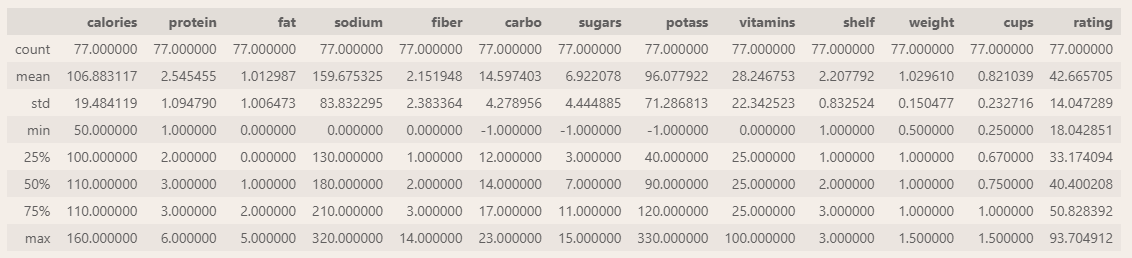
최솟값이 음수인 이상치들이 carbo, sugars, potass 세 column에서 관측되었다.
이상치 제거
flag = (cereal[['carbo', 'sugars', 'potass']] < 0).any(axis = 1)

df = cereal.loc[~flag, ]
df.describe()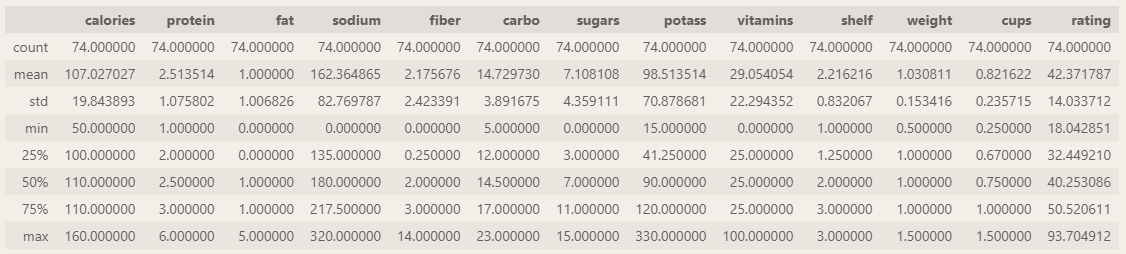
다항 회귀선 시각화
- 1차 회귀선 시각화
sns.regplot(
    data = df, x = 'sugars', y = 'rating'
)

plt.show()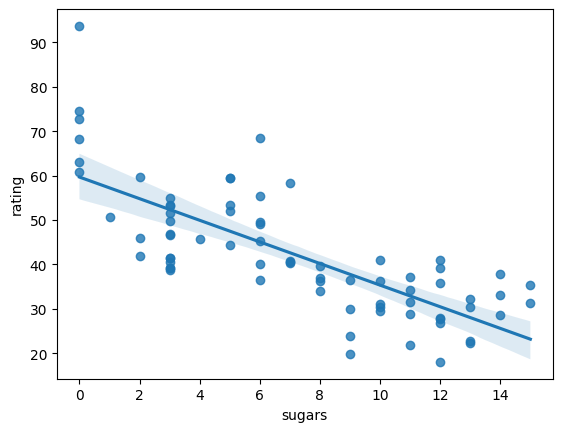
- 2차 회귀선 시각화
sns.regplot(
    data = df, x = 'sugars', y = 'rating', order = 2
)

plt.show()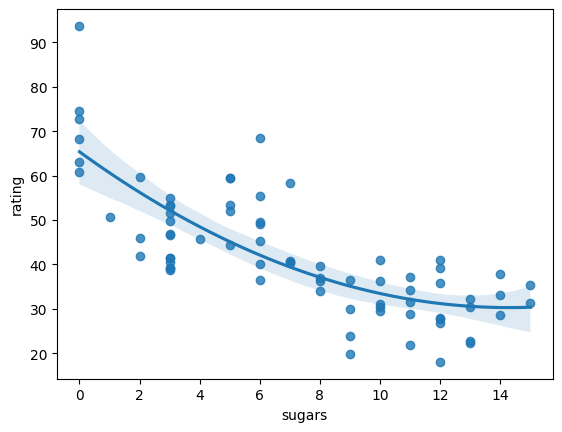
단항회귀 vs 다항회귀 결과 비교
# column 하나만 선택하기 위해 상관계수 확인

df.iloc[:, 3:].corr().iloc[-1, ]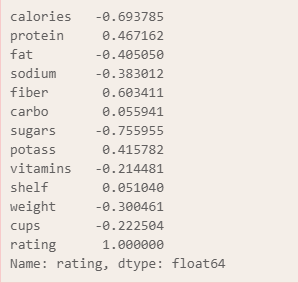
- 단항회귀
x = df[['sugars']]
y = df['rating']

X_train, X_test, y_train, y_test = train_test_split(x, y, test_size = 0.3, random_state = 42)

lr = LinearRegression()
lr.fit(X_train, y_train)

pred = lr.predict(X_test)
print(mean_absolute_error(y_test, pred))
# 7.469662633513549- 2차항(다항) 회귀
poly_reg = PolynomialFeatures()

X_train_poly = poly_reg.fit_transform(X_train)
X_test_poly = poly_reg.transform(X_test)

lr.fit(X_train_poly, y_train)
pred_2 = lr.predict(X_test_poly)

print(mean_absolute_error(y_test, pred_2))
# 6.203734788707707- 문자열로 이루어진 데이터 컬럼은 모두 제외하고, 단항회귀 vs 다항회귀 MAE 값 비교
# 단항회귀

df1 = df.select_dtypes('number')
X = df1.drop('rating', axis=1)
y = df1['rating']

X_train, X_test, y_train, y_test = train_test_split(X, y, test_size = 0.3, random_state = 42)

lr.fit(X_train, y_train)

pred_4 = lr.predict(X_test)

print('MAE:', mean_absolute_error(y_test, pred_4))
print('R2 score:', r2_score(y_test, pred_4))
print()
print('회귀계수:', lr.coef_, ', 절편:', lr.intercept_)
# 다항회귀

X_train_poly = poly_reg.fit_transform(X_train)
X_test_poly = poly_reg.transform(X_test)

lr.fit(X_train_poly, y_train)

pred_5 = lr.predict(X_test_poly)

print('MAE:', mean_absolute_error(y_test, pred_5))
print('R2 score:', r2_score(y_test, pred_5))
print()
print('회귀계수:', lr.coef_, ', 절편:', lr.intercept_)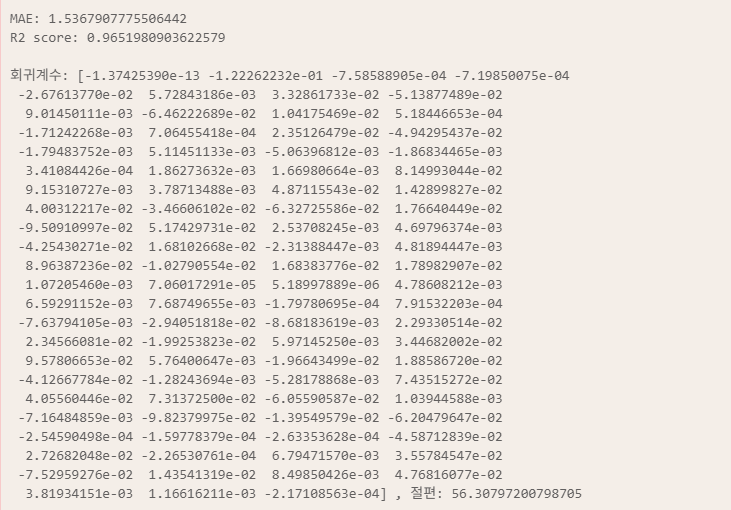
💻 Ridge
diabetes dataset 활용
import pandas as pd
import numpy as np
from sklearn.datasets import load_diabetes
from sklearn.linear_model import Ridge, LinearRegression
from sklearn.model_selection import train_test_split
from sklearn.metrics import mean_absolute_error, r2_score
import matplotlib.pyplot as plt

diabetes = load_diabetes()
df = pd.DataFrame(diabetes['data'], columns= diabetes['feature_names'])
df.head()
alphas = np.logspace(-3, 1, 5)
alphas			# array([1.e-03, 1.e-02, 1.e-01, 1.e+00, 1.e+01])

data = []

for a in alphas:
    # 모델 생성
    ridge = Ridge(alpha = a)
    ridge.fit(diabetes['data'], diabetes['target'])
    # 학습된 모델의 회귀계수를 data 리스트에 추가
    data.append(
        ridge.coef_
    )

df_ridge = pd.DataFrame(data, index=alphas, columns = df.columns)
df_ridge
plt.figure(figsize=(16, 15))

plt.axhline(y=0, linestyle='--', linewidth=2, color='black')

plt.plot(df_ridge.loc[0.001, :], '^-', color="#ffb8b8")
plt.plot(df_ridge.loc[0.01, :], 'o-', color="#ff9191")
plt.plot(df_ridge.loc[0.1, :], 'v-', color="#ff6060")
plt.plot(df_ridge.loc[1.0, :], '*-', color="#ff3434")
plt.plot(df_ridge.loc[10.0, :], 's-', color="#d40000")

plt.legend(['center', 0.001, 0.01, 0.1, 1, 10], bbox_to_anchor = (1, 1))
plt.show()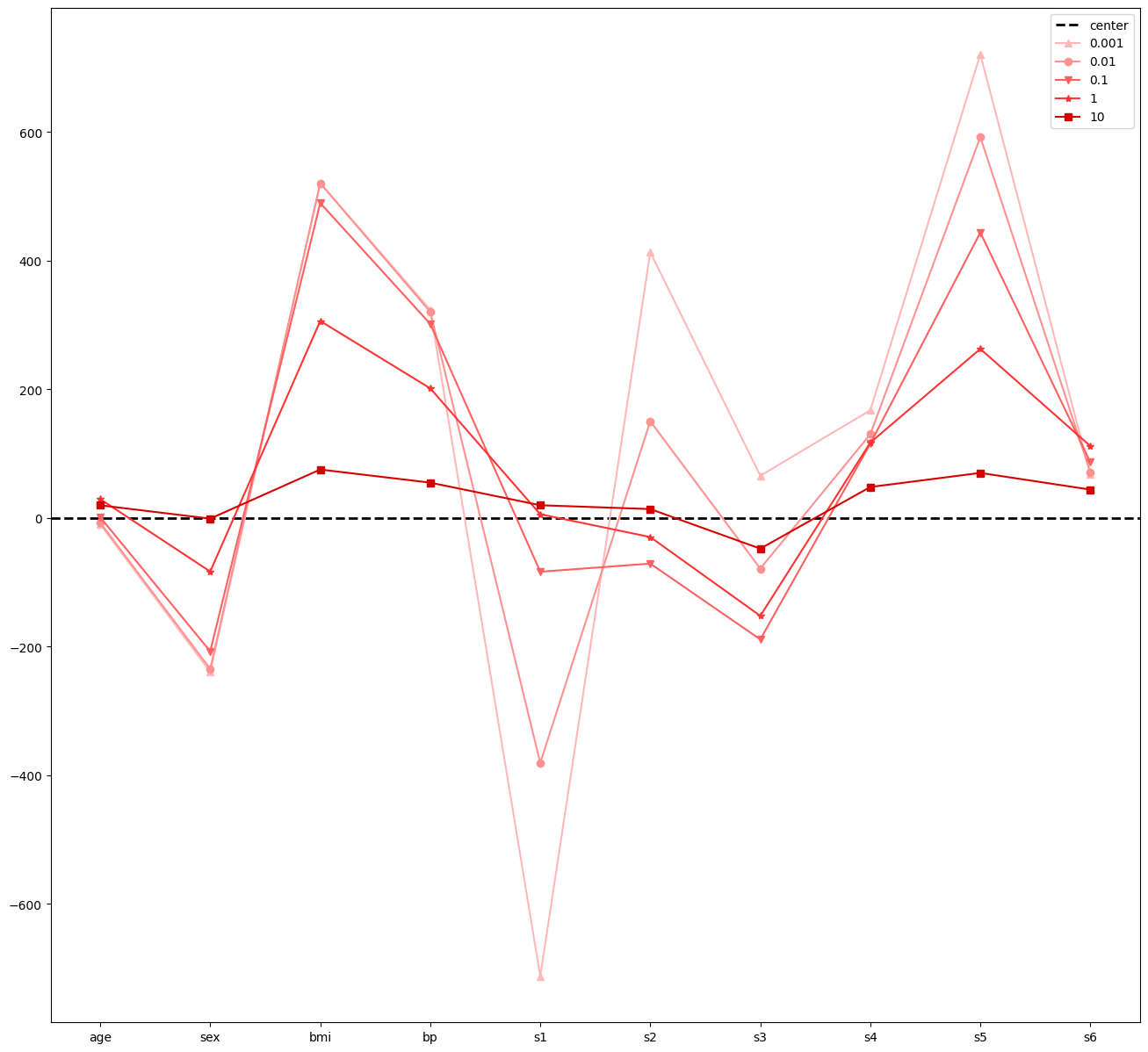
X_train, X_test, y_train, y_test = train_test_split(
    diabetes['data'], diabetes['target'], test_size=0.2, random_state=42
    )

lr = LinearRegression()
lr.fit(X_train, y_train)
pred = lr.predict(X_test)
print(round(r2_score(y_test, pred), 4))		# 0.4526

for a in [0.01, 0.1, 1]:
    ridge = Ridge(alpha = a)
    ridge.fit(X_train, y_train)
    pred2 = ridge.predict(X_test)
    print(f'alpha = {a} / MAE = {round(mean_absolute_error(y_test, pred2), 4)} / r² = {round(r2_score(y_test, pred2), 4)}')

# alpha = 0.01 / MAE = 42.8369 / r² = 0.456
# alpha = 0.1 / MAE = 42.9969 / r² = 0.4609
# alpha = 1 / MAE = 46.1389 / r² = 0.4192
미세하지만 Ridge의 성능이 더 좋은 것을 확인할 수 있다.
💻 Lasso
from sklearn.linear_model import Lassolasso_1 = Lasso(alpha = 0.01)
lasso_2 = Lasso(alpha = 0.1)
lasso_3 = Lasso(alpha = 1)
# Ridge에서 분할한 데이터 사용
lasso_1.fit(X_train, y_train)
lasso_2.fit(X_train, y_train)
lasso_3.fit(X_train, y_train)pred1 = lasso_1.predict(X_test)
pred2 = lasso_2.predict(X_test)
pred3 = lasso_3.predict(X_test)
print(mean_absolute_error(y_test, pred1)) # 42.83184707336087
print(mean_absolute_error(y_test, pred2)) # 42.85442771664998
print(mean_absolute_error(y_test, pred3)) # 49.73032753662261
print(r2_score(y_test, pred1)) # 0.4566861194580625
print(r2_score(y_test, pred2)) # 0.4718547867276227
print(r2_score(y_test, pred3)) # 0.3575918767219113💻 ElasticNet
함수 로드
from sklearn.linear_model import ElasticNet모델 호출, 학습, 예측, 평가
ela_1 = ElasticNet(alpha=0.01)
ela_2 = ElasticNet(alpha=0.1)
ela_3 = ElasticNet(alpha=1)

ela_1.fit(X_train, y_train)
ela_2.fit(X_train, y_train)
ela_3.fit(X_train, y_train)

pred_1 = ela_1.predict(X_test)
pred_2 = ela_2.predict(X_test)
pred_3 = ela_3.predict(X_test)

print(r2_score(y_test, pred_1))		# 0.37364841571505814
print(r2_score(y_test, pred_2))		# 0.09865421116113748
print(r2_score(y_test, pred_3))		# -0.0024652131111431164
처참한 결과값
5월 13일👩🏻💻
오늘의 소감: SVM을 ADsP나 빅분기에서는 꽤 깊게 다뤘던 것 같은데, 학교 실습으로는 해본 적 없는 부분이라 의문이 있었다.
오늘 해보니 더욱 잘 알겠다... 결론은 앙상블 쓰자 랜덤 포레스트 최고
💻 Logistic Regression
라이브러리, 데이터 로드
import pandas as pd
import numpy as np
import matplotlib.pyplot as plt
import seaborn as sns
import warnings

from sklearn.model_selection import train_test_split
from sklearn.linear_model import LogisticRegression
from sklearn.metrics import accuracy_score, precision_score, recall_score, f1_score, confusion_matrix

body = pd.read_csv('../data/bodyPerformance.csv')
body.head()
데이터 전처리: 문자 형태 변환
문자 형태인 gender column을 숫자 형태로 변환
body['gender'].value_counts()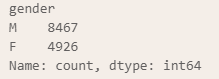
변환하는 5가지 방법
# map 활용 1
body['gender'].map(
    lambda x : 0 if x == 'M' else 1
)

# map 활용 2
body['gender'].map(
    {
        'M': 0,
        'F': 1
    }
)

# replace
body['gender'].replace('M', 0).replace('F', 1)

# numpy
np.where(body['gender'] == 'M', 0, 1)

# get_dummies
df = pd.get_dummies(body, columns = 'gender', drop_first = True)
일부러 데이터 불균형 만들기
class에서 A는 1 그 외의 값들은 0으로 변환
df['class_1'] = np.where( df['class'] == 'A', 1, 0 )
df['class_1'].value_counts()
데이터 분할
# 독립 변수 종속 변수 데이터 분할
X = df.drop(['class', 'class_1'], axis=1)
y = df['class_1']	# 불균형이 있는 컬럼 활용


# train test 데이터 분할
X_train, X_test, y_train, y_test = train_test_split(
    X, y, test_size = 0.3, random_state = 42, stratify = y
)
	# 데이터가 불균형하므로 stratify 사용
모델 생성, 학습, 예측, 평가
# 모델 생성
logR = LogisticRegression()

# 모델 학습
logR.fit(X_train, y_train)

# 예측
pred = logR.predict(X_test)

# 평가
cm = confusion_matrix(y_test, pred)
acc = accuracy_score(y_test, pred)
prc = precision_score(y_test, pred)
rcll = recall_score(y_test, pred)
f1 = f1_score(y_test, pred)
혼동 행렬 시각화
plt.figure(figsize = (7, 5))

sns.heatmap(
    cm, annot = True, cmap = 'Blues', fmt = 'd',
    xticklabels = ['pred Negative', 'pred Positive'],
    yticklabels = ['actual Negative', 'actual Positive']
)

plt.show()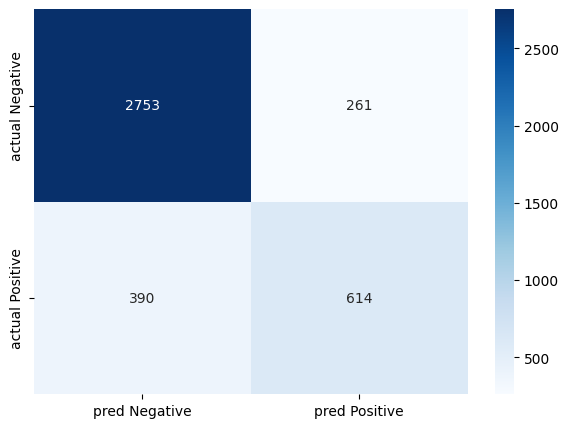
평가 지표 수치로 확인
print('정확도: ', round(acc, 2))
print('정밀도: ', round(prc, 2))
print('재현율: ', round(rcll, 2))
print('f1 score: ', round(f1, 2))
정확도는 높은 반면, 클래스 데이터의 불균형으로 인해 정밀도, 재현율, f1 score는 낮은 값을 보이는 것을 확인할 수 있다.
클래스별 예측 확률과 decision_function 확인, 시각화
번외로, 0(Not A)과 1(A)를 예측할 확률을 보여주는 함수와, 클래스별 점수를 보여주는 decision_function을 활용
# 예측 확률 데이터 확인
proba = pd.DataFrame(logR.predict_proba(X_train))

# 클래스별 점수 (분류에 대한 확신의 점수)
cs = pd.DataFrame(logR.decision_function(X_train))

# proba, cs 데이터 프레임을 단순 열결합
df2 = pd.concat([proba, cs], axis=1)
df2.columns = ['predict proba of Not A', 'predict proba of A', 'decision_function']
df2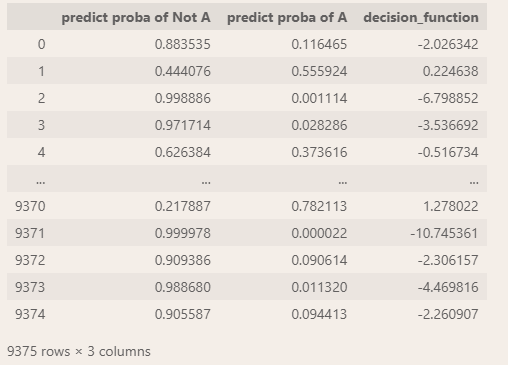
시각화
# 그래프로 만들었을 때 보기 편하도록 정렬
df2.sort_values('decision_function', inplace = True)
df2.reset_index(drop = True, inplace = True)

# 시각화
plt.figure(figsize = (16, 8))
plt.axhline(y = 0.5, linestyle = '--', linewidth = 2, color = 'black', alpha = 0.3)
plt.axvline(x = 0, linestyle = '--', linewidth = 2, color = 'black', alpha = 0.3)
plt.plot(df2['decision_function'], df2['predict proba of Not A'], '--', label = 'Not A', color = "#0400ff")
plt.plot(df2['decision_function'], df2['predict proba of A'], '--', label = 'A', color = "#ff0000")
plt.xlabel('Decision Funtion')
plt.ylabel('Predict Probability')
plt.legend()
plt.show()
데이터 불균형 해결
1. 샘플링 기법을 이용하여 데이터의 균형을 맞춘다.
2. 모델 생성 시 불균형한 데이터들에 가중치를 특별 부여
이 중 2번 방법으로 불균형 해결
logR2 = LogisticRegression(class_weight='balanced')
train, test 분할 시 이미 계층화 작업을 수행했으므로 해당 작업은 다시하지 않는다.
logR2.fit(X_train, y_train)
pred_2 = logR2.predict(X_test)

acc = accuracy_score(y_test, pred_2)
prc = precision_score(y_test, pred_2)
rcll = recall_score(y_test, pred_2)
f1 = f1_score(y_test, pred_2)

print('정확도: ', round(acc, 2))
print('정밀도: ', round(prc, 2))
print('재현율: ', round(rcll, 2))
print('f1 score: ', round(f1, 2))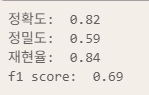

정확도와 정밀도는 감소했지만, 재현율과 f1 score는 증가한 것을 볼 수 있다.
데이터 전처리: 이상치 제거
5월 7일에 만들어놓은 outlier_iqr2 함수를 py 파일을 통해 모듈화 시켜 진행
outlier 모듈 코드
import numpy as np

def outlier_iqr(data, *cols, n = 1.5, drop = False):
    df = data.copy()
    whis_dict = {}

    for col in cols:
        try:
            q_1, q_3 = np.percentile(df[col], [25, 75])
            iqr = q_3 - q_1

            upper_whis = q_3 + (n * iqr)
            lower_whis = q_1 - (n * iqr)

            print(f'''
                지정된 컬럼의 이름: {col},
                상단 경계: {upper_whis},
                하단 경계 {lower_whis}''')

            upper_flag = df[col] > upper_whis
            lower_flag = df[col] < lower_whis
            upper_n = len( df.loc[upper_flag, ] )
            lower_n = len( df.loc[lower_flag, ] )
            print(f'상단 경계를 벗어나는 데이터의 개수: {upper_n}, 하단 경계를 벗어나는 데이터의 개수: {lower_n}')
            whis_df = df.loc[upper_flag|lower_flag, ]
            whis_dict[col] = whis_df

            if drop:
                df = df.loc[ ~(upper_flag | lower_flag), ]
            else:
                df.loc[upper_flag, col] = upper_whis
                df.loc[lower_flag, col] = lower_whis

        except Exception as e:
            print(f'Error: {e}')

    return df, whis_dict
함수 로드
from outlier import outlier_iqr이상치 제거
outlier_drop_df, outlier_dict = outlier_iqr(df, *df.drop('class_1', axis=1).columns, drop = True)
print(len(body), len(outlier_drop_df))		# 13393 12634
분할, 학습, 예측, 평가
X_train, X_test, y_train, y_test = train_test_split(
    outlier_drop_df.drop(['class', 'class_1'], axis=1),
    outlier_drop_df['class_1'],
    test_size = 0.3,
    stratify = outlier_drop_df['class_1']
)

logR2.fit(X_train, y_train)
pred_3 = logR2.predict(X_test)

acc = accuracy_score(y_test, pred_3)
prc = precision_score(y_test, pred_3)
rcll = recall_score(y_test, pred_3)
f1 = f1_score(y_test, pred_3)

print('정확도: ', round(acc, 2))
print('정밀도: ', round(prc, 2))
print('재현율: ', round(rcll, 2))
print('f1 score: ', round(f1, 2))
데이터 전처리: 샘플링
RandomUnderSampler, SMOTE 활용
필요한 부분 import
from imblearn.under_sampling import RandomUnderSampler
from imblearn.over_sampling import SMOTE
분석하기 전에 매번 같은 코드를 작성하므로 해당 부분 함수로 생성
적합~평가 함수 생성
def logR_function(x, y, weight = None):
    X_train, X_test, y_train, y_test = train_test_split(
        x, y, test_size = 0.3, random_state = 42, stratify = y
    )

    model = LogisticRegression(class_weight = weight)

    model.fit(X_train, y_train)

    pred = model.predict(X_test)

    acc = accuracy_score(y_test, pred)
    prc = precision_score(y_test, pred, average = 'macro')
    rcll = recall_score(y_test, pred, average = 'macro')
    f1 = f1_score(y_test, pred, average = 'macro')

    print('정확도: ', round(acc, 2))
    print('정밀도: ', round(prc, 2))
    print('재현율: ', round(rcll, 2))
    print('f1 score: ', round(f1, 2))
    return pred, y_test
RandomUnderSampler 활용
undersample = RandomUnderSampler(sampling_strategy = 1)
    # 소수 클래스와 다수 클래스의 숫자를 똑같이 맞춤: 약 6700개의 데이터를 날림

X = df.drop(['class', 'class_1'], axis = 1)
y = df['class_1']

X_under, y_under = undersample.fit_resample(X, y)

under_pred, y_test = logR_function(X_under, y_under)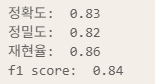
SMOTE 활용
smote = SMOTE(sampling_strategy=1)

X_over, y_over = smote.fit_resample(X, y)

over_pred, y_test = logR_function(X_over, y_over)
연습 문제
1. body 데이터에서 성별 column을 0, 1로 변환
2. class 컬럼의 데이터: A는 1, B는 2, C는 3, D는 4로 변경
3. 극단치 데이터를 경계값들로 대체
4. 로지스틱 회귀를 이용하여 혼동행렬, 나머지 성능 지표를 확인
body = pd.read_csv('../data/bodyPerformance.csv')

# 1)
body['gender'] = body['gender'].map(lambda x : 0 if x == 'M' else 1)

# 2)
body['class'] = body['class'].map( {'A': 1, 'B': 2, 'C': 3, 'D': 4} )

# 3)
outlier_replace_df, outlier_dict2 = outlier_iqr(body, *body.drop('class', axis=1).columns)

# 4)
X = outlier_replace_df.drop(['class'], axis = 1)
y = outlier_replace_df['class']

pred, y_test = logR_function(X, y)
print()
print(confusion_matrix(y_test, pred))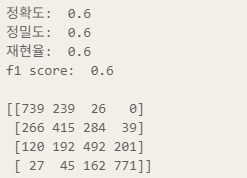
혼동 행렬 시각화
plt.figure(figsize=(7,5))

sns.heatmap(cm, annot=True, cmap='Blues', fmt='d', xticklabels=[1,2,3,4], yticklabels=[1,2,3,4])
plt.ylabel('Actual Class')
plt.xlabel('Pred Class')
plt.show()
💻 Support Vector Machine (SVM)
라이브러리, 데이터 로드
import pandas as pd
import numpy as np
import seaborn as sns
import matplotlib.pyplot as plt

from sklearn.model_selection import train_test_split
from sklearn.svm import SVC
from sklearn.metrics import accuracy_score, precision_score, recall_score, f1_score

df = pd.read_csv('../data/classification.csv')
df.head()
💡 SVC: SVM으로 분류 작업을 할 때
데이터 클래스의 분포를 그래프로 확인
sns.pairplot(
    data = df,
    hue = 'success'
)
SVC 모델 학습, 예측, 평가
X = df.drop('success', axis = 1)
y = df['success']

X_train, X_test, y_train, y_test = train_test_split(X, y, test_size = 0.3, random_state = 42)

svc = SVC()
svc_2 = SVC(C=0.1)

svc.fit(X_train, y_train)
svc_2.fit(X_train, y_train)

pred = svc.predict(X_test)
pred2 = svc_2.predict(X_test)


acc = accuracy_score(y_test, pred)
acc_2 = accuracy_score(y_test, pred2)

prc = precision_score(y_test, pred)
prc_2 = precision_score(y_test, pred2)

rcll = recall_score(y_test, pred)
rcll_2 = recall_score(y_test, pred2)

f1 = f1_score(y_test, pred)
f1_2 = f1_score(y_test, pred2)

print('정확도: ', round(acc, 4), round(acc_2, 4))
print('정밀도: ', round(prc, 4), round(prc_2, 4))
print('재현율: ', round(rcll, 4), round(rcll_2, 4))
print('f1 score: ', round(f1, 4), round(f1_2, 4))

# 정확도:  0.9 0.9
# 정밀도:  0.9821 0.9821
# 재현율:  0.873 0.873
# f1 score:  0.9244 0.9244
뭔가 잘못됐다... 왜 평가지표가 똑같이 나오는 거야🫠
근데 왜 똑같이 나오는 지 모르겠다... 어디서 잘못된거냐...
💡 SVR: SVM으로 회귀 작업을 할 때
추가 라이브러리 로드, 데이터 생성
from sklearn.svm import SVR
from sklearn.metrics import mean_squared_error, r2_score
가지고 있는 데이터로 SVR을 돌리면 시간이 너무 오래 걸려서, 간단한 데이터셋을 만들기로 했다.
x = np.sort(5 * np.random.rand(40, 1), axis = 0)
y = np.sin(x).ravel()
    # ravel: 1차원으로 변경

# 노이즈 추가
y[::5] += 3 * (0.5 - np.random.rand(8))
모델 학습, 예측, 평가
svr_rbf.fit(x, y)
svr_lin.fit(x, y)
svr_poly.fit(x, y)

pred_rbf = svr_rbf.predict(x)
pred_lin = svr_lin.predict(x)
pred_poly = svr_poly.predict(x)

index = ['RBF', 'Linear', 'Poly']
cols = ['MSE', 'R2']

result = pd.DataFrame(index = index, columns = cols)
preds = [pred_rbf, pred_lin, pred_poly]

for pred, idx in zip(preds, index):
    mse = mean_squared_error(y, pred)
    r2 = r2_score(y, pred)

    result.loc[idx, 'MSE'] = round(mse, 2)
    result.loc[idx, 'R2'] = round(r2*100, 2)

result
y가 sin 곡선에서 노이즈를 추가한 것이기에 linear나 다항식의 형태로는 좋은 성과를 거두지 못하고,
RBF(가우시안)의 형태가 가장 성능이 좋은 모습을 보였다.
5월 14일👩🏻💻
오늘의 소감: 곧 모델의 1황 랜덤 포레스트가 온다... 오늘은 그를 위한 기틀을 닦는 날🫠🫧
💻 Ensemble
hotel datasets 활용
라이브러리, 데이터 로드
import pandas as pd
from sklearn.model_selection import train_test_split
from sklearn.tree import DecisionTreeClassifier
from sklearn.ensemble import BaggingClassifier
from sklearn.metrics import f1_score

hotel = pd.read_csv('../data/hotel_bookings.csv')
데이터 전처리
이상치
hotel.info()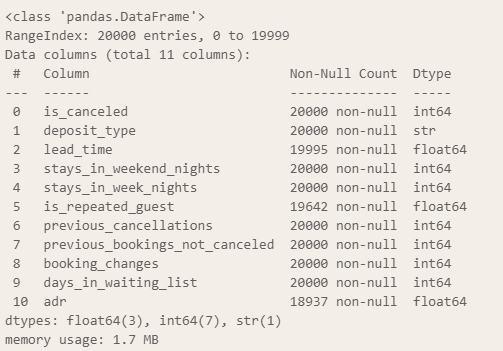
hotel.describe()
adr column은 투숙료를 의미하는데, 여기서 0보다 작은 값이 보인다.
flag = hotel['adr'] < 0
hotel.loc[flag,]
행이 하나밖에 없고, 비상식적인 수치이기에 제거한다.
hotel = hotel.loc[~flag,]
hotel.describe()
min 값이 0원이지만 공짜로 투숙하는 경우가 있을 수 있으니 해당 부분은 넘어간다.
결측치
lead_time과 adr column의 결측치들을 평균값으로 대체
hotel['lead_time'] = hotel['lead_time'].fillna( hotel['lead_time'].mean() )
hotel['adr'] = hotel['adr'].fillna( hotel['adr'].mean() )
해당 부분은 결측치를 제외하고 평균 내주는 pandas의 특성 덕에 가능하다.
0과 1로 이루어진 is_repeated_guest column의 결측치들은 최빈값으로 대체
hotel['is_repeated_guest'] = hotel['is_repeated_guest'].fillna(
    hotel['is_repeated_guest'].mode()[0]
)
범주형 변수
범주형 변수인 deposit_type를 dummy 변수로 변환한다.
hotel['deposit_type'].unique()
# ['No Deposit', 'Refundable', 'Non Refund']

hotel['deposit_type'].value_counts()
# deposit_type
# No Deposit    19137
# Non Refund      834
# Refundable       28

df = pd.get_dummies(hotel, columns=['deposit_type'], drop_first = True)
df.info()
class의 불균형 정도 확인
df['is_canceled'].value_counts()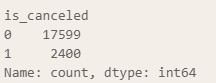
불균형이 심하긴 하지만 우선 해당 비율을 유지한 채로 분석을 시행해보겠다.
데이터 분할, 모델 생성/학습/예측/평가
데이터 분할
# 독립/종속 분할
X = df.drop('is_canceled', axis = 1)
y = df['is_canceled']

# train/test 분할
X_train, X_test, y_train, y_test = train_test_split(
    X, y, test_size = 0.2, random_state = 42, stratify = y
)

y_train.value_counts()
모델 생성
배깅 모델을 생성할 때는 기본 모델이 필요한데, 이를 위한 DecisionTree를 먼저 생성한다.
이때, class 데이터가 불균형하므로 class_weight parameter를 사용해 해당 부분을 커버해준다.
base_model = DecisionTreeClassifier(class_weight = 'balanced')
model = BaggingClassifier(base_model)
모델 학습, 예측, 평가
model.fit(X_train, y_train)
pred = model.predict(X_test)

print( round( f1_score(y_test, pred), 4 ) )
	# 0.5845
생각보다 성능이 좋지 않아, DecisionTreeClassifier의 max_depth 값을 조정해본다.
모델 생성~평가 - 수정
base_model = DecisionTreeClassifier(class_weight = 'balanced', max_depth=3)
model = BaggingClassifier(base_model)

model.fit(X_train, y_train)
pred = model.predict(X_test)

print( round( f1_score(y_test, pred), 4 ) )
	# 0.5735
오히려 성능이 더 떨어지는 모습을 보여, class의 불균형을 해소하는 방안을 시도해본다.
데이터 전처리: 샘플링
RandomOverSampler나 SMOTE 만을 그냥 사용하는 것이 아닌,
RandomOverSampler를 활용한 후, Bootstrap을 활용하는 방법을 사용해본다.
1. RandomOverSampling / 2:1로 resampling
2. Bagging model의 bootstrap을 0.8로 지정하고 n_estimators를 100으로 설정
- DecisionTree Classifier의 class_weight는 default 값으로, max_depth는 3으로 설정
from imblearn.over_sampling import RandomOverSampler

ros = RandomOverSampler(sampling_strategy=0.5)
over_X, over_y = ros.fit_resample(X, y)

over_y.value_counts()
# is_canceled
# 0    17599
# 1     8799
# Name: count, dtype: int64

base_model = DecisionTreeClassifier(max_depth = 3)
model = BaggingClassifier(max_samples = 0.8, n_estimators = 100)

X_train, X_test, y_train, y_test = train_test_split(
    over_X, over_y, test_size = 0.2, random_state = 42, stratify = over_y
)

model.fit(X_train, y_train)
pred = model.predict(X_test)

print( round( f1_score(y_test, pred), 4 ) )
# 0.9323
성능이 눈에 띄게 좋아진 것을 확인할 수 있다.
근데 여기서 내가 잘못한 부분이 무엇일까?
정답은 바로
base_model = DecisionTreeClassifier(max_depth = 3)
model = BaggingClassifier(max_samples = 0.8, n_estimators = 100)
이 부분
가만 보면 base_model을 사용하지 않았다.

근데 웃긴 게 base_model 사용하면 성능이 더 떨어진다. f1 score 0.54 정도로...

아니고 그냥 얻어걸린 거임
강사님은 max_depth를 사용하지 않아도 n_estimators가 과적합을 방지해주는 것이라 보셨다.
이후로도 max_depth를 사용하지 않은 bagging의 결과가 좋았다.
💻 Boosting
AdaBoost : 분류
라이브러리, 데이터 로드
import numpy as np
import pandas as pd
from sklearn.model_selection import train_test_split
from sklearn.ensemble import AdaBoostClassifier
from sklearn.metrics import classification_report

body = pd.read_csv('../data/bodyPerformance.csv')
body.head(3)
데이터 전처리
# gender column의 M → 0, F → 1
body['gender'] = body['gender'].map({'M': 0, 'F': 1})

# class 변환
body['class'] = body['class'].map({'A': 1, 'B': 2, 'C': 3, 'D': 4})
데이터 분할
X = body.drop('class', axis=1)
y = body['class']

X_train, X_test, y_train, y_test = train_test_split(
    X, y, test_size = 0.2, random_state = 42
)
모델 생성, 학습, 예측, 평가
clf = AdaBoostClassifier()
clf.fit(X_train, y_train)
pred = clf.predict(X_test)
print(classification_report(y_test, pred))
평가가 한 줄로 끝나다니... 신세계였다
파라미터 수정
성능을 더 끌어올려보려는 시도로 파라미터를 조정해본다.
clf2 = AdaBoostClassifier(n_estimators=500, learning_rate=0.1)
clf2.fit(X_train, y_train)
pred2 = clf2.predict(X_test)
print(classification_report(y_test, pred2))
큰 차이가 없다.
estimator-max_depth 수정
Decision Tree가 너무 단순한 형태라 생긴 문제일 수도 있기에, estimator의 값을 조정해보기로 했다.
from sklearn.tree import DecisionTreeClassifier

clf3 = AdaBoostClassifier(
    estimator = DecisionTreeClassifier(max_depth = 4),
    n_estimators = 500,
    learning_rate = 0.1
)

clf3.fit(X_train, y_train)
pred3 = clf3.predict(X_test)
print(classification_report(y_test, pred3))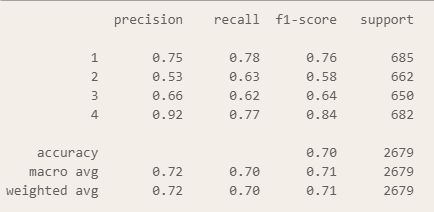
성능이 많이 좋아졌다!
AdaBoost : 회귀
라이브러리, 데이터 로드
from sklearn.ensemble import AdaBoostRegressor
from sklearn.metrics import mean_absolute_error, r2_score
car = pd.read_csv('../data/CarPrice_Assignment.csv')
데이터 전처리: 숫자 column만 필터링
df = car.select_dtypes('number')
df.drop('car_ID', axis=1, inplace = True)
데이터 분할
X = df.drop('price', axis = 1)
y = df['price']

X_train, X_test, y_train, y_test = train_test_split(
    X, y, test_size = 0.3, random_state = 42
)
모델 생성, 학습, 예측, 평가
reg = AdaBoostRegressor()
reg.fit(X_train, y_train)
pred = reg.predict(X_test)
print('MAE: ', round(mean_absolute_error(y_test, pred), 2), '/ R²: ', round(r2_score(y_test, pred)*100, 2))
# MAE:  2007.03 / R²:  90.53
오차 시각화
# 각 단계별 예측값을 이용하여 MAE를 구하고 그래프로 시각화
list(reg.staged_predict(X_test))

mae_list = []
for stage_pred in list(reg.staged_predict(X_test)):
    mae = mean_absolute_error(y_test, stage_pred)
    mae_list.append(mae)

# 시각화
plt.figure(figsize=(30, 10))
plt.plot(mae_list)
plt.xlabel('Count')
plt.ylabel('MAE')
plt.show()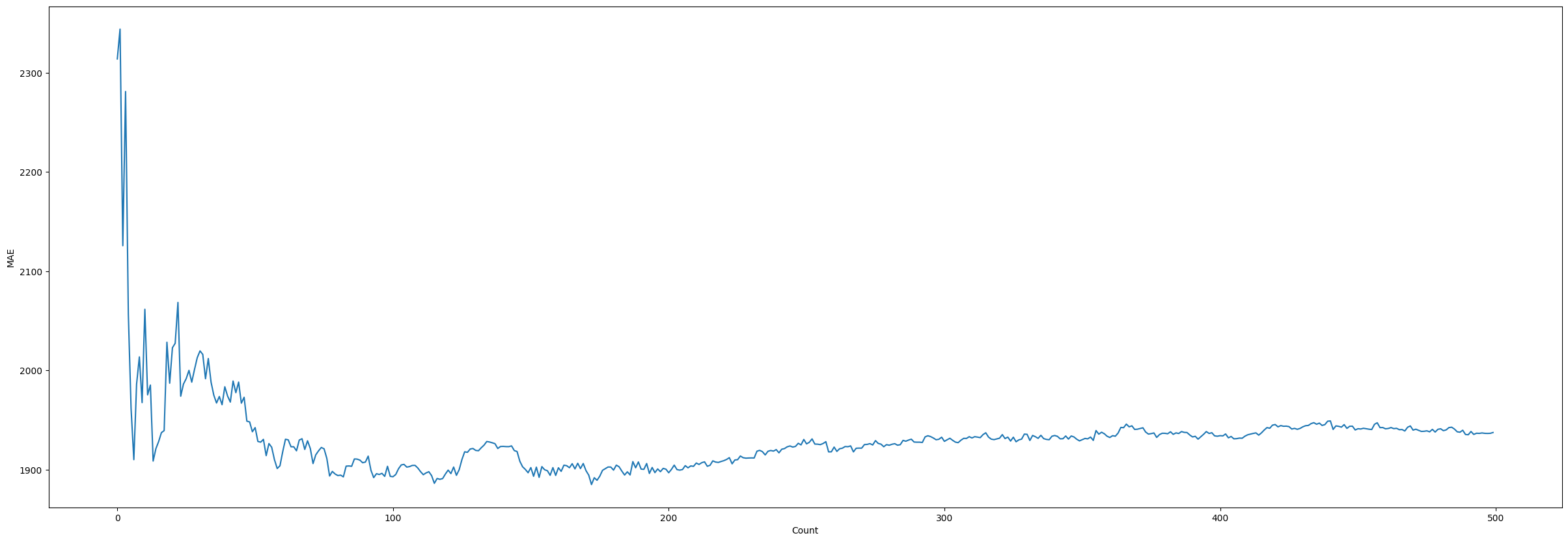
변수 중요도 시각화
importance = reg.feature_importances_
cols = X.columns

importance_df = pd.DataFrame(
    zip(cols, importance),
    columns = ['feature_name', 'importance']
)

importance_df.sort_values('importance', ascending = False, inplace=True)
importance_df.reset_index(drop = True, inplace = True)
importance_df
plt.figure(figsize = (25, 10))
plt.bar(importance_df['feature_name'], importance_df['importance'])
plt.show()
5월 15일👩🏻💻
오늘의 소감: 랜포는 신이다
💻 RandomForest
body dataset 활용
라이브러리, 데이터셋 로드
import pandas as pd
import numpy as np

from sklearn.model_selection import train_test_split
from sklearn.metrics import classification_report, mean_absolute_error, r2_score
from sklearn.ensemble import RandomForestClassifier, RandomForestRegressor

body = pd.read_csv('../data/bodyPerformance.csv')
body.head()
데이터 전처리: LabelEncoder
저번과 마찬가지로 gender column과 class column을 숫자형 데이터로 변환해줄 것인데,
이번엔 LabelEncoder를 사용해보기로 하였다.
# LabelEncoder → 문자형 데이터들을 숫자형으로 변환
from sklearn.preprocessing import LabelEncoder
labelencoder = LabelEncoder()
body['class_1'] = labelencoder.fit_transform(body['class'])
body['gender'] = labelencoder.fit_transform(body['gender'])
body.head()

범주형 데이터를 숫자로 인식하게 되면 범주형 데이터간의 관계를 찾으려할 수 있으므로,
독립적인 범주형 데이터에서는 사용하지 않는 것이 좋다.
sklearn.preprocessing에 속해 있기에 기본 동작은 scaler와 동일하다.
X = body.drop(['class', 'class_1'], axis=1)
y = body['class_1']

X_train, X_test, y_train, y_test = train_test_split(
    X, y, test_size = 0.3, random_state = 42, stratify = y
RandomForestClassifier 사용
clf = RandomForestClassifier()
clf.fit(X_train, y_train)
pred = clf.predict(X_test)

print(classification_report(y_test, pred))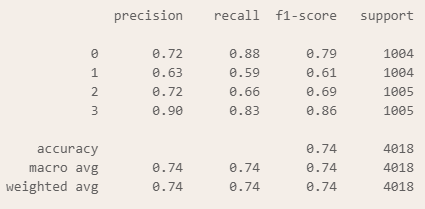
parameter 변경
1. 모델의 개수를 증가
2. 각 트리에서 사용되는 샘플을 70%로 제한
3. `min_sample_leaf`를 기본값 1에서 4로 변경
clf2 = RandomForestClassifier(
    n_estimators = 200,
    max_samples = 1.0,
    min_samples_leaf = 1,
    max_features = 6
)

clf2.fit(X_train, y_train)
pred2 = clf2.predict(X_test)

print(classification_report(y_test, pred2))
값이 미세하게 증가했다.
💻 Pipeline
iris dataset 활용
라이브러리, 데이터 로드
import pandas as pd
from sklearn.pipeline import Pipeline
from sklearn.preprocessing import StandardScaler, LabelEncoder
from sklearn.svm import SVC
from sklearn.model_selection import train_test_split
from sklearn.metrics import classification_report

iris = pd.read_csv('../csv/iris.csv')
데이터 전처리, 분할
le = LabelEncoder()
iris['species'] = le.fit_transform(iris['species'])
iris['species'].value_counts()
X = iris.drop('species', axis = 1)
y = iris['species']

X_train, X_test, y_train, y_test = train_test_split(
    X, y, test_size = 0.2, random_state = 42, stratify = y
)
파이프 라인
pipe = Pipeline(
    [
        ( 'scaler', StandardScaler() ),     # step 1
        ( 'model', SVC() )                  # step 2

    ], verbose = True
)

pipe.fit(X_train, y_train)
pred = pipe.predict(X_test)
print(classification_report(y_test, pred))
💻 GridSearchCV
그대로 iris dataset 활용
Pipeline이 여러 단계를 연속적으로 실행하는 자동화 도구였다면,
GridSearch는 이 Pipeline을 활용해서 최적의 파라미터를 찾아준다.
라이브러리 로드
from sklearn.model_selection import GridSearchCV
자세한 파라미터 설명은 K-fold를 결합한 부분에서 언급하겠다.
# SVC 모델 생성

svc = SVC()

# svc에서 사용할 매개변수의 목록들을 작성
grid_dict = {
    'C' : [ 0.1, 1, 10 ],
    'kernel' : [ 'linear', 'rbf' ],
    'gamma' : [ 'scale', 'auto' ]
}

grid = GridSearchCV(
    estimator = svc,
    param_grid = grid_dict,
    cv = 5,
    scoring = 'accuracy',
    verbose = 1,
)


grid_dict
grid.fit(X_train, y_train)


print('최적의 파라미터 조합: ', grid.best_params_)
print('최적의 점수: ', grid.best_score_)
print('최적의 모델: ', grid.best_estimator_)
💻 K-Fold
데이터셋을 K개의 동일 크기로 나눠서 K번 반복
이때, 하나의 폴드를 검증용으로 사용, K-1개의 폴드를 학습용으로 사용
라이브러리 로드
import numpy as np
from sklearn.model_selection import KFold, StratifiedKFold
K-Fold logic
X = np.array(
    ['A', 'B', 'C', 'D', 'E', 'F', 'G', 'H', 'I', 'J']
)

# KFold
kfold = KFold(n_splits = 5)

list(kfold.split(X))

for train_idx, test_idx in kfold.split(X):
    print('-' * 60)
    print("학습 데이터의 목록: ", X[train_idx])
    print("검증 데이터의 목록: ", X[test_idx])
k-fold는 해당 로직으로 굴러간다는 것을 볼 수 있다.
Pipeline + GridSearchCV + K-Fold
1. boston 데이터셋 로드
2. 독립변수, 종속변수로 데이터 분할
3. train, test 8:2
4. K-Fold 이용하여 10개의 폴드 생성 (shuffle=True)
5. Pipeline 생성 (StandardScaler(), SVR())
6. 파라미터 조합 생성 (svr 모델에서 C(1, 10, 100), kernel('linear', 'rbf'), epsilon(0.1, 0.2, 0.5))
7. GridSearchCV 베스트 모델 선정의 기준은 neg_mean_squared_error
8. 최고의 조합을 찾은 뒤 R2 score를 이용하여 성능을 확인
9. 최적의 파라미터를 이용하여 새로운 모델을 생성하고 성능 R2 score 확인
# 1)
boston = pd.read_csv('../csv/boston.csv')

# 2)
X = boston.drop('Price', axis = 1)
y = boston['Price']

# 3)
X_train, X_test, y_train, y_test = train_test_split(
    X, y, test_size=0.2, random_state=42
)
# 4)
kfold = KFold(n_splits=10, shuffle=True, random_state=42)
# 5)
pipe = Pipeline(
[
('scaler', StandardScaler()),
('reg', SVR())
]
)# 6) ~ # 7)
params = {
'reg__C' : [1, 10, 100],
'reg__epsilon' : [0.1, 0.2, 0.5],
'reg__kernel' : ['linear', 'rbf']
}
grid_reg = GridSearchCV(
estimator= pipe, # 파이프라인으로 생성한 모델을 지정
param_grid= params, # dict 형태로 파라미터의 조합
scoring = 'neg_mean_squared_error', # 베스트 모델 선정 기준
cv = kfold, # 생성해둔 KFold 지정
refit = True, # 재학습 여부
n_jobs = -1, # 모든 CPU를 사용
return_train_score= True, # 학습 데이터의 성능을 출력
verbose = 2 # 로그 표시를 상세하게
)# 8)
grid_reg.fit(X_train, y_train)
grid_reg.score(X_test, y_test) # -12.063990309898506
print(grid_reg.best_estimator_)
# Pipeline(steps=[('scaler', StandardScaler()), ('reg', SVR(C=100, epsilon=0.5))])
# 9)
pred = grid_reg.predict(X_test)
from sklearn.metrics import r2_score
print(round(r2_score(y_test, pred), 4)) # 0.83556주차 소감
모델과 함께 몰아쳤던 6주차
만약 내가 기초 지식이 없었다면 견뎌낼 수 있었을까...?🫠
ADsP 준비할 때의 기억이 새록새록했던 한 주였다. 그 땐 이론만으로도 머리 싸맸었는데...
빅분기 대비가 제대로 된 것 같아 뿌듯하다.
이제 더이상 sklearn의 서브 모듈 기억 못해서 로지스틱 못 불러오는 바보같은 짓은 안 하겠지
다음 주는 비지도 학습에 대해 배운 뒤 딥러닝으로 넘어갈 시간이다.
사실 딥러닝보다는 자연어 처리가 더 무섭긴 하지만...ㅋㅋㅋ 다음 주도 성실하게 참여하자!
'멀티캠퍼스부트캠프' 카테고리의 다른 글
| 7주차 Note: 머신러닝/딥러닝 (0) | 2026.05.24 |
|---|---|
| 5주차 Note: 머신러닝 (1) | 2026.05.08 |
| 4주차 Note: 데이터 시각화 (0) | 2026.05.01 |
| 3주차 Note: 데이터 수집 (0) | 2026.04.26 |
| 2주차 Note: 프로그래밍 기초, 데이터 수집 (0) | 2026.04.26 |